
Our news
Basic tips for cleaning your printer
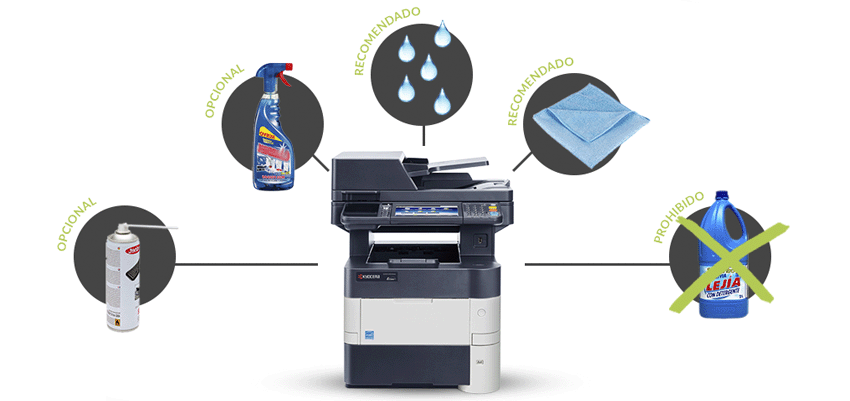
A printer represents a significant investment, and that's why it's highly recommended to take care of it and keep it clean at all times if we want to use it for as long as possible.
Below, we give you some guidelines to help you do it.
First, a good external cleaning
It's a very simple operation, but we must be careful. First, we disconnect it from the power outlet, and then, using a damp microfiber cloth, we proceed to clean its exterior.
It is important that we do not apply any type of liquid directly to our equipment.
We can use a little water for that external cleaning and use glass cleaner for the scanner area.
Now let's get the scraps of paper
To easily remove these remnants, we can remove the paper from the printer trays and open the printer to check for any remaining paper scraps inside. We should do all of this very carefully to avoid damaging any components of the printer.
For smaller debris located in hard-to-reach areas, we can use a can of compressed air.
We continue with the inner zone
These parts are responsible for moving the paper through the printing area, so it's vital to keep them as clean as possible. Failure to do so will result in troublesome paper jams.
To do this, we will use a microfiber cloth dampened with water or isopropyl alcohol to clean them properly. We remind you that these operations must always be carried out with extreme care to avoid forcing anything.
We're almost finished…
Finally, we'll check that everything is in order and that we haven't left anything inside. We'll also make sure there are no wet or excessively damp areas.
Then we close everything up, put the paper back in the trays, and connect the printer to print a test page to make sure everything is working correctly.
Now you know how easy it is to do a basic cleaning operation... Go for it!
