
Windows virtual desktop
Move all your company's IT to the cloud in the most agile way and without any investment or commitment.

Safer
Immediate availability of data in case of loss or breakage of equipment and greater control thanks to the limitation of access and resources.

Always up-to-date
Regular automatic updates reduce incidents and promote optimal performance of computer equipment.

Very flexible
Prepared to grow or shrink without being conditioned by the IT infrastructure, both in desktops or servers, and in resources.
Virtual desktops:
your PC in the cloud
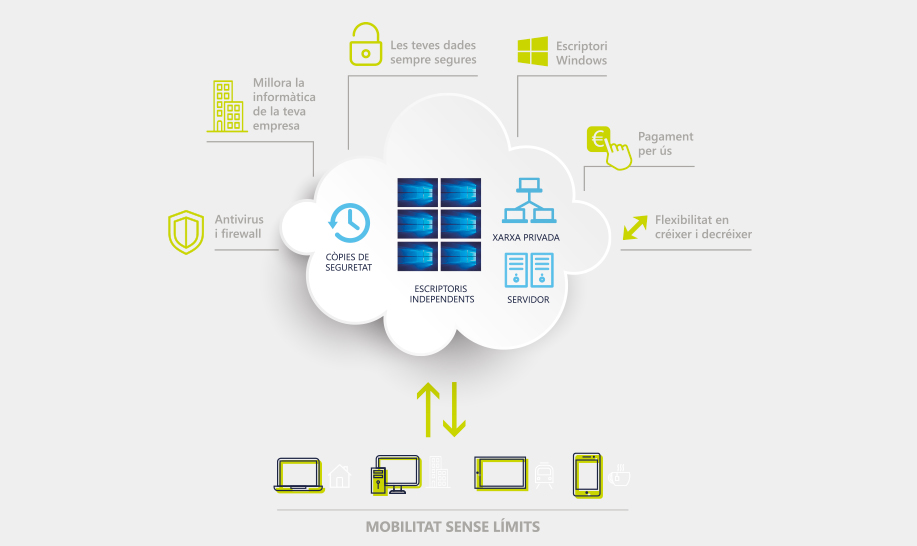
Windows virtual desktop
He Windows virtual desktop It is the ultimate solution to achieve maximum unlimited mobility for your SME, as you will be able to access all the information you need about your company in the cloud in an agile, secure and efficient way.
A virtual desktop relies on pre-configured images of operating systems and applications where the desktop environment is separate from the physical device used to access it. This allows users to access their virtual desktops remotely over a network. Any endpoint device, such as a laptop, smartphone, or tablet, can be used to access a virtual desktop. The virtual desktop provider installs the client software on the endpoint device, and the user then interacts with that software on the device.
The benefits of a virtual desktop are numerous, as it feels like a physical workstation, but the user experience is often even better because resources such as storage and back-end databases are readily available. Given this, users can decide whether or not to save changes or permanently install applications, depending on how the virtual desktop is configured.
The Windows virtual desktop allows you to enjoy immediate access to your data in case of equipment failure or loss, by limiting access and resources, as it is a work tool that is always up to date. It evolves automatically through regular updates, which reduce incidents and promote optimal equipment performance.
When a company has a virtual desktop, it benefits from a highly flexible and scalable tool that grows with the business and allows for efficient work from anywhere. Thanks to the Windows virtual desktop, you can expand your reach to teleworking, work while traveling, or work remotely on an occasional basis, as you'll have a virtual PC with the same applications, tools, documents, and resources as your office PC, enabling you to work as efficiently as possible, regardless of your location.
This tool becomes a comprehensive solution for any company, as it's designed so that the company doesn't have to worry about infrastructure, updates, security permissions, user configurations, backups, etc. It's a solution designed for any type of service company, multi-site business, etc.
It's a great way to upgrade your IT without investing upfront, enjoying a pay-per-use system with no long-term commitment. This translates into a comprehensive, tailor-made solution that allows you to have your work tools available at all times and also saves you money on your bills.
Windows virtual desktops allow you to work in a secure environment with full accessibility, data encryption, encrypted connections, and an automatic backup system. A virtual desktop provides excellent security because data is stored in the data center, not on individual terminals. Imagine, for example, that an endpoint device is stolen; ultimately, thieves will not be able to access the data, giving the company great peace of mind.
You can enjoy comprehensive management of all desktops, gaining greater control over updates, application installation, desktop maintenance through the control panel, and more. Furthermore, the company can save on the expense of costly physical machines that are often used only for a short period.
In terms of costs, you'll significantly reduce hardware expenses, as the Windows virtual desktop runs on a cloud computing server, eliminating the need for cutting-edge equipment. A virtual desktop requires less physical hardware and maintenance, making it more cost-effective for your business.
It's a system that offers the same functionalities as a physical computer, making the transition to this solution in business environments completely intuitive. Software updates are quick and easy, and can be performed in bulk rather than on a machine-by-machine basis, saving considerable time. Using a virtual desktop is as easy and user-friendly as a traditional one; the user simply logs into the device over the network and can interact with applications normally, choosing whether or not to customize settings or save data locally, depending on their needs.
You can contact us to find out more about virtual desktops by calling 938 606 220, or by filling out the contact form with your details and query.
